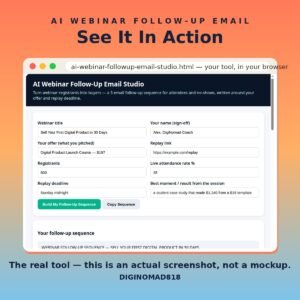
Most webinar sales happen after the live session — in the follow-up most hosts never send properly. AI Webinar Follow-Up Email Studio writes the complete 3-email sequence around your offer and replay deadline: the replay recap (within 2 hours, to everyone), the objection answer (next day, to non-buyers), and the deadline close — plus the audience maths for your registrants and attendance rate so you can see what the sequence is worth.
Complete 3-email sequence — replay recap, objection answer and deadline close, subjects included
Attendee and no-show maths — live attendees and win-back audience calculated from your real numbers
Replay deadline in every email — a follow-up without a deadline is a newsletter, and this tool never writes one
Objection email built in — time, budget and starting-from-zero answered head-on instead of a weak 'just checking in'
Your best live moment featured — the case study or result from your session carried into Email 1
Built-in sample webinar pre-filled so you can see the full sequence before entering your own details
100% offline single HTML file — your registrant numbers never leave your machine
AI Webinar Follow-Up Email Studio is a single-file, offline tool that builds the email system behind a profitable webinar. Enter the webinar title, your offer, the replay link and deadline, your registrant count and live attendance rate, and it writes three complete emails with subject lines, calculates how many people attended live versus how many no-shows you can still win back, and prints the sequence rules that decide whether follow-up converts: segment attendees from no-shows, send the replay within two hours, and put the deadline in every single email.
The point is simple: the live pitch reaches a third of your registrants on a good day. The other two-thirds meet your offer in their inbox — or never meet it at all.
How to use it
Open the HTML file in any modern browser — no installation, server, or internet connection needed.
Enter your webinar title, sign-off name, the offer you pitched, and your replay link.
Add the replay deadline and the best moment or result from the live session.
Enter your registrant count and live attendance rate to see your attendee and no-show numbers.
Click Build My Follow-Up Sequence and review all three emails and the audience maths.
Load the emails into your email platform with the send timing noted on each one.
Click Copy Sequence to save the full set for your next webinar.
Who it's for
Coaches and course creators whose webinars end with applause and no sales system behind them
Webinar hosts with hundreds of no-shows and no plan to win them back
Workshop and masterclass sellers running the same session monthly
Anyone whose entire follow-up is currently one replay link and a hope
What you get
One self-contained HTML file (HTML + CSS + JavaScript in a single file) delivered as a ZIP download
Works offline in any modern browser on Windows, Mac, or Linux
No API keys, no accounts, no subscriptions, no data collection — your details never leave your device
Lifetime use of the file you download; buy once, use it as many times as you like
Send Email 1 within 2 hours while intent is warm — a next-day replay email loses half its opens, and no copy fixes late.