






AI Case Study Builder Studio
$14.97
A great client result is worthless if you can’t show it. AI Case Study Builder Studio turns the facts of a client win — the challenge, what you did, the before/after numbers — into a complete, ready-to-publish case study: three headline options, the full story, a results table and a client pull-quote, in minutes.
– **Three headline options per case study** — results-first, problem-first and transformation angles, so you can pick the one that fits the audience
– **Full story structure built from your facts** — client, challenge, solution, results and call to action, written in a clean narrative, not a fill-in-the-blank form
– **Results table from your own before/after numbers** — specific metrics with before → after, so prospects see proof instead of adjectives
– **Client pull-quote block** — their words, their name and role, formatted and ready to drop into proposals and your website
– **How-to-use guide included** — where to publish it, how to attach it to proposals, and how to open sales calls with it
– **Built-in sample data, copy and download** — test it instantly with a sample client, then copy the full case study or save it as a .txt
– **100% offline, single HTML file** — no account, no subscription, no API key, no data sent anywhere; open it in any browser and it just works
### What it does
AI Case Study Builder Studio is a single-file, offline tool that turns a client win into a case study that sells. Enter the client, their industry, what you did, the challenge they faced, your solution, and the results as before/after numbers — and it writes the case study for you: three headline options to choose from, the narrative in order (client, challenge, solution, results), a results table, a client quote block, a plain-English “what this means for you” section, a call to action, and a short guide on where to use the case study once it’s written.
The point is simple: case studies are the highest-converting sales asset most freelancers and agencies never make, because writing one feels like a big project. This tool turns it into a 10-minute job.
### How to use it
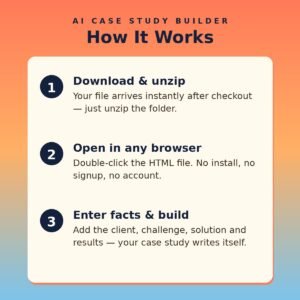
1. Open the HTML file in any modern browser — no installation, server, or internet connection needed.
2. Fill in the client name, industry, service, timeframe, challenge and solution in your own words.
3. Add results one per line in the format `Metric | Before | After` — real numbers, not adjectives.
4. Add the client quote and author, pick a headline angle, and click **Build My Case Study**.
5. Pick your favourite of the three headlines, then click **Copy Case Study** to paste it into your website, proposal or portfolio.
6. Repeat for every client win — a portfolio of three short case studies beats one long one.
Tip: keep every metric specific and checkable (“no-show rate 18% → 6%”). Prospects trust numbers they could verify and ignore claims they can’t.
### Who it’s for
– Freelancers, agencies and consultants who need social proof to win the next client
– Solo sellers and service providers whose best work is invisible because it’s never written down
– Coaches and course creators who want student results in a format they can publish
– Anyone who has ever thought “I should write a case study about that” and never did
### What you get
– One self-contained HTML file (HTML + CSS + JavaScript in a single file) delivered as a ZIP download
– Works offline in any modern browser on Windows, Mac, or Linux
– No API keys, no accounts, no subscriptions, no data collection — client details never leave your device
– Lifetime use of the file you download; buy once, use it for every client
*Note: the tool writes from the facts you enter — it does not invent results. Use real client numbers, and get the client’s permission before publishing their name and quote.*
Related products
-

AI API Playground
$19.97 -
AI Support Ticket Triage Studio
$14.97 -
AI Product Name Generator Studio
$14.97 -
AI Cover Letter Writer Studio
$13.97