




AI Cost Calculator — Token & API Cost Estimator
$14.97
Stop guessing what your AI bill will be. AI Cost Calculator estimates your monthly API spend across every major provider before you write a single line of code.
– Compare 12 models side by side — OpenAI, Anthropic, Google, DeepSeek, xAI, Mistral, and Qwen — with live monthly, per-request, and yearly costs
– Model prices are editable ballparks — overwrite any price to match the provider’s current pricing page
– Factor in prompt caching discounts and cached-input share to see what caching really saves you
– Save unlimited usage scenarios (dev vs prod, cheap vs flagship) on your device and recall them anytime
– Export the full comparison as CSV for budgets, client quotes, and investor decks
– 100% offline single HTML file — no signup, no API key, your data never leaves your browser
### Know your AI bill before you build
AI API pricing is a maze of per-token rates, caching discounts, and model tiers. Pick the wrong model and a side project quietly becomes a $500/month surprise. AI Cost Calculator turns token math into a number you can plan around — in about sixty seconds.
### Key features
– **12-model price book** — GPT-4o mini through Claude Opus 4.1, Gemini 2.5, DeepSeek, Grok 4, and more, each with editable per-1M-token input/output prices.
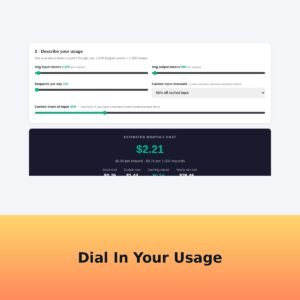
– **Real usage modeling** — sliders for average input/output tokens per request, requests per day, cached-input discount, and cached share of input.
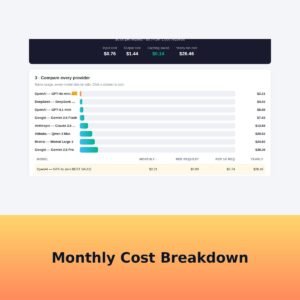
– **Instant cost breakdown** — monthly total, per-request and per-1,000-request cost, input vs output split, caching savings, and yearly run-rate.
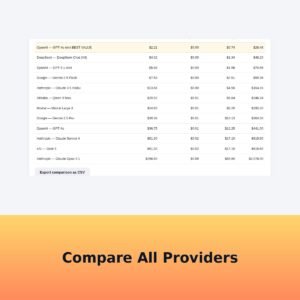
– **Side-by-side comparison** — sortable table and visual bar chart rank every provider by your exact usage, with the best-value model highlighted automatically.
– **Scenario saving** — keep dev, staging, and production plans (or cheap-vs-flagship comparisons) stored in your browser and switch between them in one click.
– **CSV export** — download the full comparison for budgets, proposals, and client billing.
– **Completely private** — one HTML file, zero network calls, nothing uploaded. Your usage numbers stay on your device.
### How it works
1. After checkout, download the ZIP and open the single HTML file in any modern browser.
2. Pick a model, drag the usage sliders, and watch your monthly estimate update live.
3. Compare providers, save scenarios, and export the CSV.
### Who it’s for
Indie hackers estimating SaaS margins, agencies quoting AI features to clients, and anyone choosing between models who wants the cheapest option that still does the job.
### Delivery
Instant download after checkout. One self-contained HTML file — works offline on Windows, Mac, and Chromebook.