Kling vs Runway vs Seedance 2.0: The Best AI Video Generator in 2026
Sora is gone. The three AI video generators that replaced it — Seedance 2.0, Kling, and Runway — compared on price, audio, clip length, character consistency, and the terms nobody reads before uploading.

Disclosure: This post contains affiliate links. If you sign up through them, we may earn a
commission at no extra cost to you. Recommendations here are based on capability, price, and the terms you’re
agreeing to — not commission rates. Where a tool has a catch, we say so.
Read our full Affiliate & Earnings Disclaimer.
For two years, the AI video conversation was “Sora versus everyone.” Then OpenAI did something almost nobody predicted: it discontinued Sora as a standalone product. The model that defined the category simply left it.
What filled the vacuum is more interesting than what left. Three tools now dominate, and they are genuinely different animals: Seedance 2.0, ByteDance’s multimodal newcomer that took the category by storm. Kling, the value champion with the longest clips in the business. And Runway, which stopped competing on model quality and became a production studio in your browser.
This guide compares all three on quality, price, clip length, character consistency, access — and the terms you’re agreeing to when you upload. There’s a clear winner for most creators, and there’s a catch that two of the three share which almost no other comparison will tell you about.
Key Takeaways
- Seedance 2.0 is the most capable multimodal generator — native audio, multi-shot, many reference inputs. Access is the problem.
- Kling wins on price and clip length, with a refreshing free tier that lets you test properly.
- Runway wins on control and consistency — and now licenses rival models, including Seedance, inside its own platform.
- Two of the three are Chinese-owned, with terms granting a licence to use your uploads for model training. Read them before you upload client work.
- Sora is discontinued. If you still have clips there, export them.
Related reading: If you’re editing footage rather than generating it, see our
best CapCut alternatives guide, and our
roundup of the best AI video tools for avatars, voiceovers, and repurposing.
⚡ The Short Answer
Most Capable
Seedance 2.0The strongest multimodal model: native synchronised audio, multi-shot storytelling, and many reference inputs in a single pass. Held back by fragmented, region-dependent access — and ByteDance’s terms.
Best Value
KlingLowest cost per usable second, the longest continuous clips, native 4K, and a free tier with daily refreshing credits. The default pick for most creators — with a terms caveat.
Best Control
RunwayA real timeline, motion brush, and the most mature character-consistency tools. Pricier and slower, but the most predictable output — and it now hosts rival models too.
Discontinued
SoraShut down as a standalone product in 2026. Not an option. Export anything you have stored there.
First: What Happened to Sora
In March 2026, OpenAI announced it was sunsetting Sora as a standalone product, redirecting the compute toward its multimodal models. The web and app experiences were switched off in late April 2026, with the API scheduled to close in September 2026.
If you have clips stored in Sora, export them now. Content left on a discontinued platform is
typically deleted permanently once shutdown completes. Download your generations and any prompts you want to keep.
Why did the best model lose? Two reasons, and both explain the shape of the market that replaced it. Price: Sora’s per-second cost was several times what its rivals now charge, making batch production unviable. And it was a generator, not a platform: beautiful clips, then nothing — no editor, no way to revise a generated clip, no motion controls. Workflow and economics beat raw quality. Keep that in mind as you choose a replacement.
Seedance 2.0: The Most Capable Model
Seedance 2.0
Most CapableSeedance is developed by ByteDance’s Seed research team — the same company behind TikTok and CapCut. When Seedance 2.0 launched in February 2026, search interest exploded and it immediately became the most-discussed video model in the industry. The hype was earned.
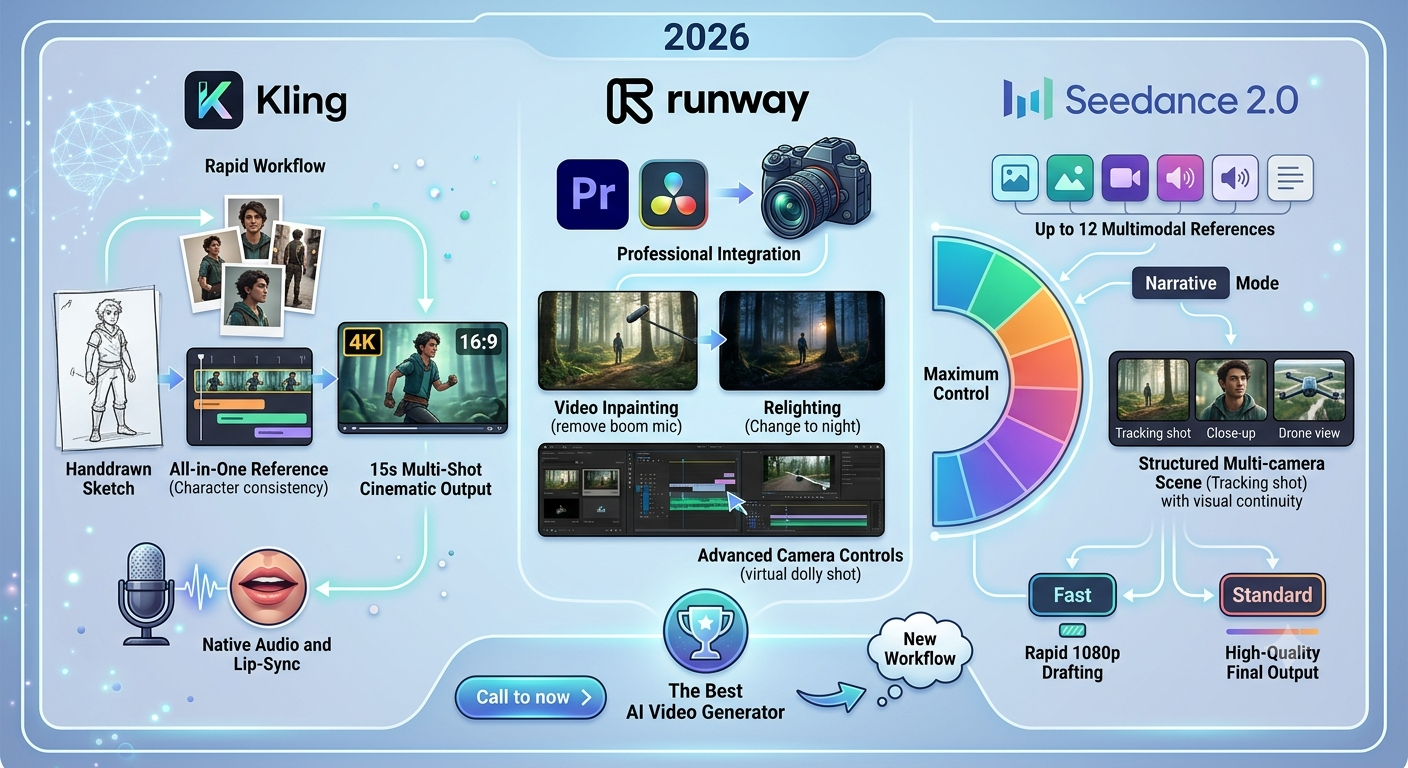
Its breakthrough is genuine multimodality. Most generators chain separate systems for video, then audio, then stitching. Seedance 2.0 accepts text, images, video, and audio as inputs simultaneously, and produces synchronised dialogue, sound effects, ambient noise, and music alongside the picture in a single generation pass. A character speaking in a large room gets natural reverb — the kind of audio-visual coherence that previously required post-production.
Standout capabilities
- Truly multimodal inputs — text, image, video, and audio together
- Native synchronised audio, including dialogue with accurate lip-sync
- Multi-shot storytelling with consistent characters across cuts
- Up to a dozen reference files per generation for style and character control
- High-resolution output, multiple aspect ratios, clips in the 4–15 second range
- Animates still images — photos, illustrations, even AI-generated art — while preserving style
Pricing: no single flat price. Cost varies by resolution, clip length, generation mode (Standard / Fast / Mini), and whether you use reference inputs. The same clip can cost roughly $1 on one platform and nearly $3 on another. Consumer subscriptions start in the mid-teens per month. Verify on your chosen platform.
Pros
- Best-in-class audio-visual coherence
- Most flexible reference-input system
- Excellent multi-shot character consistency
- Strong image-to-video animation
- Available inside Runway and other platforms
Cons
- Fragmented, region-dependent access
- ByteDance terms and data jurisdiction
- No self-hosting, no open weights, no fine-tuning
- Pricing is opaque and varies wildly by platform
- Queue times and reported model downgrades at peak load
- Copycat websites muddy the search results
Best for: Creators who need dialogue, sound design, and multi-shot narrative from a single prompt — and who can navigate the access maze.
Visit Dreamina (Official) →Seedance 2.5 is imminent. ByteDance announced the next generation in June 2026, promising
substantially longer native generations, far more reference inputs, native 4K, and controllable editing. If you’re
evaluating Seedance, check whether 2.5 has landed before you commit to a subscription tier.
Kling: The Value Champion
Kling AI
Best ValueKling is built by Kuaishou — ByteDance’s biggest domestic rival in short video. Its latest generation runs on a unified multimodal architecture that produces video and synchronised audio in a single pass, and it has quietly become one of the most widely used video generators on earth.
Two things make it the default recommendation for most creators. Price: on a per-second basis it undercuts nearly every premium model. And clip length: Kling generates the longest continuous footage in the category by a wide margin, eliminating the stitching that shorter models force on you.
Standout capabilities
- Native 4K output at high frame rates — not upscaled
- Longest continuous clips available anywhere
- Multi-shot generation holding subject position and appearance across cuts
- Native synchronised audio
- Exceptional facial realism when animating still portraits
- Camera controls — zoom, pan, tilt, dolly — plus motion brush and reference images
- Free tier with daily refreshing credits, not a one-time bank
Pricing: free tier with recurring daily credits · paid plans start in the single-digit dollars per month, with commercial rights on paid tiers. Among the lowest per-second costs of any premium model. Verify current pricing.
Pros
- Best price-to-quality ratio in the category
- Longest clips available
- Native 4K and native audio
- Free tier that genuinely refreshes daily
- Best-in-class human faces and motion
- Faster generation than Runway
Cons
- Terms grant a licence to use your content for training
- Content processed under Chinese data law
- Documented billing complaints at renewal
- Thin customer support
- Moderation blocks politically sensitive prompts
- Higher variance between generations; more retries
Best for: Creators producing high volumes of short-form social video, character-driven content, or anything needing longer continuous shots — on a real budget.
Try Kling Free →Runway: The Control Champion
Runway
Best Creative ControlRunway made a strategic decision no rival has matched: it stopped trying to win on model quality alone and became a platform. Its own model ranks at the top of independent leaderboards, but the real product is the environment around it — and, remarkably, Runway now licenses its competitors’ models, including Seedance and Kling, to run inside its own editor.
You get a proper timeline, a motion brush for directing movement in specific regions of a frame, scene expansion, text-instruction edits on already-generated footage, and reference-image controls: upload a photo of a character, and subsequent clips hold that character’s face, clothing, and style. For anyone building a series rather than a one-off clip, that last feature is the whole ballgame.
Standout capabilities
- Reference images — the most mature character-consistency solution available
- Motion brush — paint which parts of a scene move, and how
- Timeline editor with multi-shot scene management
- Text-instruction edits on generated footage, without leaving the platform
- Scene expansion and 4K upscaling
- Multiple models under one subscription — including Seedance and Kling
- Most predictable output — lowest variance between generations
Pricing: free trial with a one-time credit bank that does not refresh · Standard around $15/mo · Pro around $35/mo · Unlimited roughly $76–95/mo. Different models consume credits at very different rates — a Seedance clip costs far more credits than a lightweight one. Verify current pricing.
Pros
- Unmatched creative control surface
- Best character consistency across shots
- Most consistent, predictable results
- Edit generated footage in place
- Access rival models under one subscription
- Unlimited plan suits high-volume users
Cons
- Considerably more expensive per second than Kling
- Free credits are one-time; they don’t renew
- Slower generation times
- Shorter maximum clip length
- Credit pricing is hard to predict
- Steepest learning curve of the three
Best for: Filmmakers, agencies, and brand creators who need the same character across many shots, precise control, and predictable output more than cheap generations.
Visit Runway →The sneaky play: because Runway licenses Seedance and Kling alongside its own model, a single Runway subscription can give you access to all three — inside a real editor. It costs more per clip, but it may cost less than three subscriptions and a fragmented workflow.
Head-to-Head: Seedance vs Kling vs Runway
| Seedance 2.0 | Kling | Runway | |
|---|---|---|---|
| Maker | ByteDance (China) | Kuaishou (China) | Runway (US) |
| Cost per second | Varies wildly by platform | Lowest of the premium models | Mid — roughly 1.5–2× Kling |
| Free tier | Limited trial credits, watermarked | Daily credits, refreshing | One-time credits, no refresh |
| Max clip length | Short (4–15s) | Longest in category | Short; stitch for longer |
| Native 4K | Coming in 2.5 | Yes | Via upscaling |
| Native audio | Best — dialogue + sound design | Yes | Yes (passable) |
| Reference inputs | Most flexible (many files) | Several | Strong (character refs) |
| Character consistency | Strong (multi-shot) | Strong (multi-shot) | Best (reference images) |
| Editing tools | Minimal | Minimal | Full timeline + motion brush |
| Output consistency | Good | Higher variance; more retries | Most predictable |
| Access | Fragmented, region-dependent | Straightforward, global | Straightforward, global |
| Data / ToS concern | Training licence; Chinese jurisdiction | Training licence; Chinese jurisdiction | Standard commercial terms |
Prices and specs in this category change monthly. Model versions ship constantly and per-second costs have fallen sharply over the past year. Treat this table as directional and check each platform’s official pricing page before subscribing.
The Quality Question Nobody Answers Honestly
Every comparison article shows a hero clip and declares a winner. That’s the wrong test, and it’s why people subscribe to a tool and feel let down a week later.
Any of these models produces a stunning single clip on a good generation. What matters in production is the question no demo reel answers: if you need twenty clips in the same style, with the same character and the same lighting, what percentage are usable without regenerating?
On that measure the ranking flips. Kling and Seedance produce some of the most visually impressive individual outputs — and more variance between them. The hero clips are outstanding; the weaker ones need retries. Runway’s outputs are less likely to make you gasp and far more likely to be usable first time.
Budget for retries. Most usable clips take somewhere between three and eight attempts. A plan
that looks generous on paper gets thin fast once you count re-renders. When comparing costs, multiply the headline price
by your realistic retry count. That’s your true cost per usable clip, and it’s the number that should decide this.
This is where Kling’s price advantage compounds rather than shrinks: if it costs a third of Runway per generation and needs twice the retries, it’s still cheaper. But if you’re producing a branded series where every clip must match, Runway’s consistency saves time worth more than the credit difference.
The Terms You’re Agreeing To
This section exists because most reviews skip it entirely, and because it applies to two of the three tools here.
Both Seedance and Kling are Chinese-owned — ByteDance and Kuaishou respectively. Both process your content under Chinese data law, and both grant themselves a licence to use uploaded content to improve their AI systems. On Kling’s free tier, generations may run through a public queue where prompts and reference images can be visible to others; private modes are reserved for higher paid tiers.
To be clear about what this does and doesn’t mean:
- For personal creative work and general marketing content, most creators accept this without issue. Some form of training licence is common across AI platforms — it is not unique to Chinese companies, and this isn’t a point about nationality. It’s a point about what specific terms say.
- For client deliverables, unreleased products, proprietary brand assets, or other people’s faces, it is a real consideration. Some agency teams keep these tools in their personal workflow and avoid them for client work entirely.
- Moderation on both operates under rules aligned with Chinese regulations, blocking politically sensitive subject matter. Irrelevant for most commercial content; a hard wall for journalism or documentary work.
- Kling’s billing has drawn repeated complaints — introductory prices reverting silently at renewal, credits deducted for failed generations, and charges reported after cancellation. Watch your renewal date.
- Seedance offers no self-hosting, no open weights, and no fine-tuning. Your workflow depends entirely on ByteDance’s infrastructure and policy decisions.
Read the terms yourself before uploading anything sensitive. This applies to every tool here.
Most AI platforms grant themselves some licence over uploads; the details differ, they change, and they’re the only thing
standing between your client’s unreleased product shot and someone’s training set.
The Access Problem (and the Fake Websites)
Seedance’s biggest weakness isn’t the model. It’s getting to it.
Access is fragmented across ByteDance’s own platforms, region-locked services, licensed third-party integrations, and developer APIs — each with different pricing, different credit systems, and different free-trial terms. The identical clip can cost roughly a dollar on one route and nearly three on another. Some routes require a Chinese phone number and local payment methods. Others geofence by region or degrade output quality under heavy server load.
Beware of imposter sites. Several websites use the Seedance name while having no affiliation
with ByteDance whatsoever — at least one states this outright in its own FAQ. They may be perfectly legitimate businesses
running entirely different models, but if you searched for “Seedance” expecting ByteDance’s video model, you may not be
buying what you think you’re buying. Confirm the platform is an official or officially licensed route before you pay.
Practically, that leaves three sensible paths: ByteDance’s own international creative platform, a licensed third-party host such as Runway, or the developer API if you’re building something. By contrast, Kling and Runway are simply websites you sign up to. That convenience is worth real money.
Worth Knowing: Veo and the Rest
Google’s Veo is the quality leader in several respects — native 4K, excellent lip-sync, transparent per-second API pricing, and a fast tier cheap enough for rapid drafting. If you’re already in Google’s ecosystem or want the most mature API, it belongs on your shortlist. Its weakness is subtle: technically superb output that can lack the organic, hand-crafted feel of the best clips from rivals.
Open-source models now generate credible video for a fraction of a cent per second, but they require GPU hardware and command-line comfort. If you’re technical and generating at scale, the economics become absurd in your favour.
And a note on strategy: multi-model platforms are quietly winning. No single model excels at everything, and subscribing to a platform that lets you switch engines per project increasingly beats committing to one.
Which Should You Choose?
Skip the benchmark tables. Answer these instead:
- Making high volumes of social clips on a budget? Kling. Nothing comes close on price per usable second, and the free tier refreshes daily so you can test properly.
- Need dialogue, sound design, and multi-shot narrative from one prompt? Seedance 2.0 — if you can get clean access to it. Consider reaching it through Runway rather than wrestling with regional platforms.
- Need the same character across many shots for a branded series? Runway. Reference images remain the most mature solution to the hardest problem in AI video.
- Need continuous footage longer than a few seconds? Kling. It’s the only realistic option for extended narrative shots without stitching.
- Working on client deliverables with proprietary material? Runway, or Veo. Read the Chinese-owned tools’ terms first and decide whether you’re comfortable.
- Want all three without three subscriptions? Runway, which licenses rival models inside its own editor.
- Not sure yet? Exhaust Kling’s free tier first and find out whether it covers eighty per cent of what you need. Only then decide whether the remaining twenty per cent justifies Runway’s control or Seedance’s audio.
Don’t subscribe to all three. Most creators pay for multiple AI video tools before identifying
their primary use case, then use one. Start free, find your workflow, then pay for the tool that fits it.
Generators Aren’t Editors (The Step Everyone Forgets)
Here’s the practical reality that catches new users out: none of these tools replaces a video editor. They generate raw material. Almost everyone using them professionally treats the generator as an acquisition layer, then brings clips into a real editor for assembly, colour, titles, and delivery.
Users who expect a finished, publish-ready video from a single prompt hit the inconsistency problem within an hour. Users who treat every generation as raw footage to select from and cut together get dramatically better results.
So your actual stack looks like this:
- Generate clips in Seedance, Kling, or Runway.
- Assemble them in an editor — DaVinci Resolve if you want free and professional, or a browser editor if you want fast.
- Or skip both and use a script-to-video tool like InVideo, which handles generation and editing in one place with stock footage, voiceover, and templates. Less cinematic, far faster, and often the right answer for marketing content.
That last option is the one most solopreneurs actually need. Cinematic AI generation is thrilling, but if the job is a product explainer or a social clip that converts, the tool that gets you there fastest wins.
Frequently Asked Questions
Is Seedance 2.0 better than Kling?
On audio and multimodal inputs, yes — Seedance generates dialogue, sound effects, and music in one pass with exceptional coherence. On price, clip length, native 4K, and ease of access, Kling wins comfortably. For most creators, Kling is the more practical tool; for narrative work with dialogue, Seedance is worth the friction.
Is Sora still available in 2026?
No — not as a standalone product. OpenAI announced it was sunsetting Sora in March 2026, the web and app experiences ended in late April, and the API is scheduled to close in September 2026. Export any clips you still have stored, and check OpenAI’s current announcements, as this situation continues to evolve.
Is Seedance 2.0 free?
Only partly. Eligible new accounts on ByteDance’s official platforms receive limited trial credits, and free output is typically watermarked. There is no universal unlimited-free entitlement, despite what some websites claim. Stable use requires a paid subscription, credit pack, or API access.
Are these tools safe to use for client work?
Read the terms first. Both Seedance and Kling grant their parent companies a licence to use uploaded content to improve their AI systems, and process content under Chinese data law. For personal and general marketing content most creators accept this. For client deliverables, unreleased products, or other people’s faces, many professionals use Runway or Veo instead.
Can I use AI-generated video commercially?
Generally yes on paid plans, but licences vary by platform and tier, and free tiers are often restricted to personal use. Output ownership and copyright also vary by jurisdiction. Check the specific terms of the plan you buy.
Do I still need a video editor?
Yes. These tools generate clips, not finished videos. You’ll still assemble, colour-correct, add titles, and export somewhere else — unless you use a script-to-video platform that handles the whole pipeline.
The Bottom Line
Sora set the bar and then walked away from it. What replaced it is a healthier, stranger market: three strong tools with genuinely different personalities, all cheaper and more capable than the thing they replaced — and one of them, Runway, happily renting out its rivals’ engines.
If you’re a solopreneur or creator making social content on a budget, start with Kling’s free tier, and go in with your eyes open about the terms. If you need dialogue and sound design generated with the picture, Seedance is the most capable model in the world right now — reach it through an official or licensed route, and don’t upload anything you wouldn’t want in a training set. If you’re building something where the same character must appear across a dozen shots, or where a client’s material is involved, pay for Runway and don’t look back.
And if what you actually need is a marketing video rather than a cinematic clip, a script-to-video tool like InVideo will get you there faster than any of them. Pick by workflow, not by benchmark. The best model is the one that fits the videos you actually make.
Automate the work around the video.
Generating clips is the fun part. Our Make.com Automation Blueprint Pack handles everything else — repurposing one video into posts, captions, and clips across every platform, automatically.
Get the AI Video Prompt →